
How I Fixed Cloudflare Sitemap 403 and 522 Errors
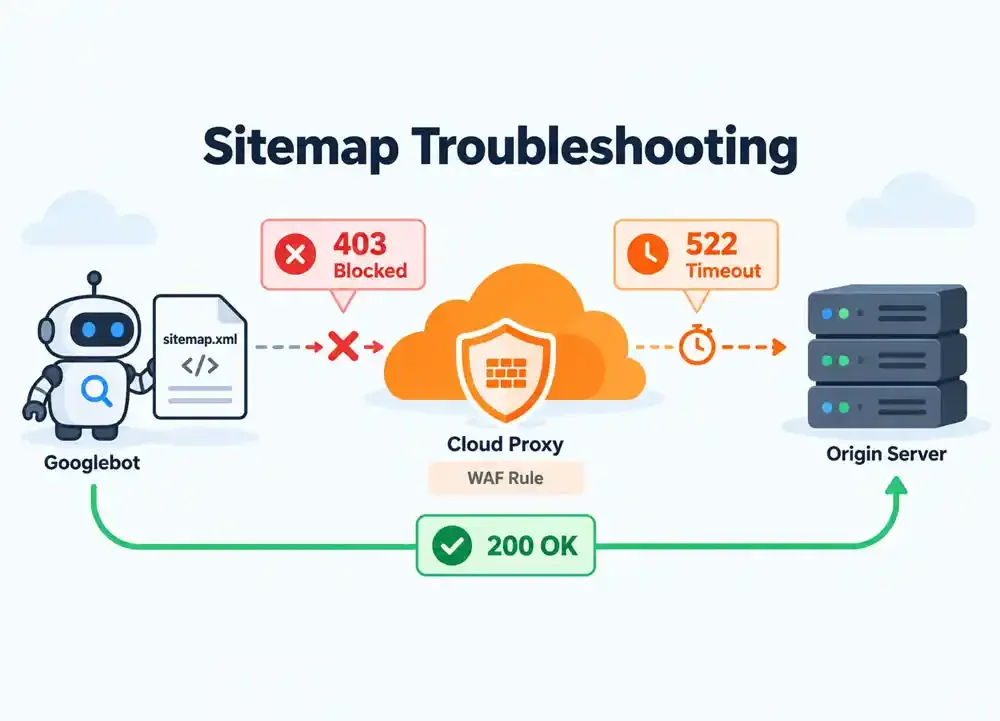
A real-world troubleshooting story involving Cloudflare WAF, Googlebot, Google Search Console, and a self-hosted HestiaCP server.
On September 24, 2026, I encountered an unexpected issue while moving my technology blog, blogsite.me, to Cloudflare.
The migration had a straightforward objective: take advantage of Cloudflare's caching capabilities to improve website performance while keeping the application hosted on my existing server.
The website itself was running normally. Its pages were accessible, and the XML sitemap could be opened directly through a browser.
However, when I checked Google Search Console, I discovered that Google could no longer retrieve my sitemap.
The reported HTTP status was 403 Forbidden.
My first suspicion was that something had gone wrong during the nameserver migration. Perhaps the new DNS configuration was incorrect, the origin server was rejecting Googlebot, or a Cloudflare security feature was unintentionally blocking legitimate crawlers.
What initially appeared to be a simple sitemap problem eventually involved two different HTTP errors, several Cloudflare security events, and a series of network connectivity tests.
Here is how I investigated the issue.
The affected sitemap was available at:
https://blogsite.me/sitemap.xml
Before modifying the application's sitemap generator or its routing configuration, I decided to check Cloudflare's security logs. I opened the Cloudflare dashboard and navigated to Security → Analytics → Events. Initially, I found a request to /sitemap.xml with the following information:
Parameter				Value
User-Agent				ChatGPT-User
Verified Bot Category			AI Assistant
Mitigation				Not mitigated
Path					/sitemap.xml
This request was not blocked, but it also wasn't the request I needed to investigate.
The actual issue involved Googlebot.
After examining additional security events, I found a request from Google's AS15169 network, identified by Cloudflare as a verified search engine crawler.
The event contained the following details:
Parameter				Value
ASN					AS15169 — Google LLC
User-Agent				Googlebot/2.1
Verified Bot Category			Search Engine Crawler
HTTP Method				GET
Requested Path				/sitemap.xml
Mitigation				Block by Managed Rules
This provided the first confirmed cause of the problem.
Googlebot was reaching Cloudflare, but Cloudflare's Managed Rules were blocking its request before the sitemap could be retrieved.
At this stage, changing the CodeIgniter sitemap generator or restarting Nginx would not address the identified WAF block.
With the initial cause identified, I created a Cloudflare Custom Rule named:
Allow Verified Bots - Sitemap
Rather than allowing every visitor to bypass the WAF, I restricted the rule to verified bots requesting the sitemap.
The rule used the following expression:
(http.host eq "blogsite.me"
and http.request.uri.path eq "/sitemap.xml"
and cf.client.bot
and http.request.method in {"GET" "HEAD"})
I selected Skip as the action and configured the rule to bypass WAF Managed Rules.
The cf.client.bot field was particularly important because it identifies bots verified by Cloudflare. Using this field is more reliable than allowing requests solely based on a Googlebot User-Agent string, which can be spoofed.
Cloudflare's Skip action allows administrators to exempt matching requests from selected security features without disabling those protections across the entire website.
After deploying the rule, I checked Security Events again.
This time, Googlebot requests were matching my custom rule, and the logs showed:
Service: Custom rules
Action: Skip
Rule: Allow Verified Bots - Sitemap
It looked promising. Unfortunately, the problem wasn't completely resolved.
While examining the latest security events, I noticed something unusual.
The same Googlebot request had generated two security events. One showed that my custom rule had executed the Skip action, while another showed that Cloudflare had blocked the request.
Both events shared the same Ray ID.
The blocking event identified the following rule:
Service: Managed rules
Action: Block

Ruleset:
Cloudflare Bot Management rules for all plans

Rule:
Block AI training crawlers - BOBA-199
Interestingly, Cloudflare had already identified the visitor as a verified search engine crawler.
Nevertheless, the request had also matched a rule designed to block AI training crawlers.
This demonstrated why seeing a Skip event alone wasn't enough to confirm that Googlebot could access the sitemap.
A Skip action only bypasses the security features selected in its configuration. Other security components can still evaluate or block the request.
I reviewed the custom rule configuration and Cloudflare's AI bot policies.
For troubleshooting, I temporarily configured all available AI bot policy categories to Allow.
Subsequent security logs showed several Googlebot requests matching the custom Skip rule. The requests came from Google's AS15169 network, confirming that the exception continued to recognize the crawler.
However, before I could declare the problem resolved, Google Search Console reported another error.
This time, it was HTTP 522.
The new error initially made the situation more confusing.
The first problem was a confirmed WAF block. The new error indicated a different issue involving communication between Cloudflare and the origin server.
According to Cloudflare's documentation, HTTP 522 occurs when Cloudflare times out while communicating with the origin. Possible causes include firewall restrictions, incorrect origin IP addresses, server overload, and network connectivity problems.
Cloudflare Support docs
Since the website was hosted on a VPS managed through HestiaCP, I needed to determine whether the origin server could still respond normally.
I started by bypassing Cloudflare and requesting the sitemap directly from the origin.
Testing the origin server directly
I used curl with the --resolve option to connect to the origin IP while retaining the correct hostname.
curl -k -sS \
  --connect-timeout 10 \
  --max-time 30 \
  --resolve blogsite.me:443:46.250.227.157 \
  -o /dev/null \
  -w 'HTTP: %{http_code}\nTotal: %{time_total}s\n' \
  https://blogsite.me/sitemap.xml
The --resolve option directs the request to the specified IP address without changing the URL's hostname.
The -k option disables TLS certificate verification for this diagnostic test. It can be useful when testing an origin that uses a Cloudflare Origin Certificate.
My server returned:
HTTP: 200
Total: 0.105102s
The sitemap was successfully retrieved in approximately 105 milliseconds.
This established that the origin could serve the sitemap normally from the testing environment.
It did not, however, prove that every Cloudflare data center could establish the same connection.
Next, I tested the public sitemap URL to determine whether the timeout could be reproduced.
I executed the following loop from my VPS:
for i in {1..10}; do
  curl -sS --max-time 30 \
    -o /dev/null \
    -w "HTTP: %{http_code} | Total: %{time_total}s\n" \
    https://blogsite.me/sitemap.xml
  sleep 2
done
The results were:
HTTP: 200 | Total: 5.204696s
HTTP: 200 | Total: 0.165722s
HTTP: 200 | Total: 0.161093s
HTTP: 200 | Total: 0.137852s
HTTP: 200 | Total: 0.389245s
HTTP: 200 | Total: 0.359545s
HTTP: 200 | Total: 1.408446s
HTTP: 200 | Total: 0.272224s
HTTP: 200 | Total: 0.155262s
HTTP: 200 | Total: 0.285503s
All ten requests returned HTTP 200.
Although the first request took approximately 5.2 seconds, the others completed significantly faster.
These results indicated that the public sitemap URL was responding successfully during my tests. The HTTP 522 error reported by Google Search Console could not be reproduced from my testing location.
I also inspected the Fail2Ban service on the HestiaCP server.
sudo fail2ban-client status
Fail2Ban reported seven active jails, including SSH, mail, HestiaCP, and recidive protection.
However, the presence of active jails did not establish that Fail2Ban was blocking Cloudflare.
I attempted to inspect the Nginx domain access log, but the file wasn't available at the path I initially checked. Consequently, I couldn't establish an origin-side cause for the earlier timeout.
The important distinction was that the origin and public URL were now responding successfully, even though the precise cause of the temporary 522 error remained unconfirmed.
After the WAF adjustments and connectivity tests, I checked Google Search Console again.
This time, the sitemap retrieval succeeded.
The earlier HTTP 403 and subsequent HTTP 522 errors were no longer preventing Google from retrieving sitemap.xml.
The final outcome confirmed that Google could access the sitemap again. The logs also established that the original HTTP 403 had been caused by Cloudflare's Managed Rules.
The temporary HTTP 522 was a separate issue. Although connectivity tests later succeeded, I did not identify a specific firewall, DNS, or server configuration change that definitively explained its disappearance.
Successfully retrieving a sitemap also doesn't mean that every URL it contains will automatically be indexed. Google treats sitemap submission as a discovery signal, while crawling and indexing remain separate processes.
The most important lesson from this incident was to investigate the actual request rather than relying exclusively on the error displayed by Google Search Console.
A sitemap that opens normally in a browser may still be blocked when Googlebot requests it.
Cloudflare Security Events proved particularly useful because they exposed the exact security service, action, rule, and Ray ID associated with each request.
Another important discovery was that a successful Custom Rule Skip event doesn't necessarily mean the request was accepted. Examining other events associated with the same Ray ID revealed the additional BOBA-199 block.
Finally, testing the origin directly helped separate the WAF problem from the later connectivity problem.
There is also a security consideration worth mentioning. Allowing every AI crawler was useful as a temporary diagnostic setting in this case, but it is not necessarily the appropriate long-term configuration for every website.
For a production environment, I would prefer narrowly scoped exceptions for verified search engine crawlers while maintaining the desired restrictions on other automated traffic.
Migrating a website to Cloudflare is not just about changing nameservers and enabling caching. Its security features introduce another layer that needs to be considered when troubleshooting website availability and search engine crawling.
In my case, a confirmed Cloudflare WAF block initially prevented Googlebot from retrieving the sitemap. A custom exception and a review of the AI bot policies addressed the security configuration, while subsequent connectivity tests helped investigate a separate HTTP 522 error.
The sitemap was eventually retrieved successfully by Google Search Console.
The experience reinforced a simple operational principle: when a crawler encounters an HTTP error, examine the security logs, identify the actual blocking rule, and test each network layer independently before changing application code or disabling security protections.