
From robots.txt to Bot Observatory: How Curiosity About AI Crawlers Became a Research Project
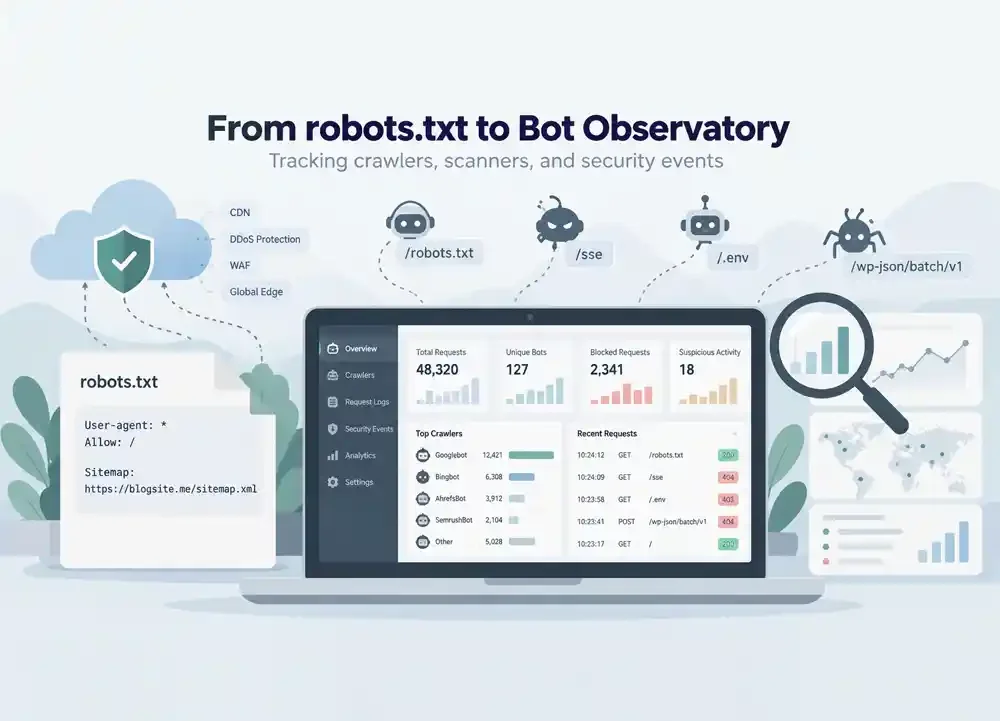
It started with a simple goal: preventing AI crawlers from using my blog content for model training. But after migrating to Cloudflare, an unexpected robots.txt issue led me down a much more interesting path—exploring how bots, crawlers, and automated scanners interact with my website.
While developing blogsite.me, I began thinking about something I had previously paid little attention to: how do search engines and AI crawlers actually interact with the content I publish?
As a technology blog where I share real-world IT experiences, I naturally want my articles to be discoverable through Google, Bing, and other search engines. But what about crawlers that collect website content to train AI models?
That question led me to take a closer look at robots.txt.
Initially, I created a dynamic robots.txt file using a CodeIgniter 4 controller. The goal was straightforward: allow search engine crawlers to index my articles while restricting certain crawlers associated with AI model training.
The configuration worked as expected before I migrated the website to Cloudflare.
That was when things started getting complicated.
After migrating blogsite.me to Cloudflare, I noticed something confusing.
Sometimes, when I checked my robots.txt file, I could see additional rules inserted by Cloudflare. On subsequent checks, those rules would occasionally disappear.
Things became even more interesting when Google Search Console started reporting problems with my robots.txt file.
At first, I suspected that my custom rules were conflicting with Cloudflare's automatically generated rules.
After investigating, I discovered that Cloudflare has a feature called Managed robots.txt, which can prepend its own crawler policies to an existing robots.txt file served by the origin server.
However, I couldn't conclusively determine whether the Google Search Console errors were caused by conflicting rules, unsupported directives, caching, or some other issue.
Rather than continuing to experiment with rules that might interfere with search engine crawling, I decided to simplify my robots.txt configuration:
User-agent: *
Allow: /

Sitemap: https://blogsite.me/sitemap.xml
For the time being, I allowed crawlers to access my public content and adjusted Cloudflare's AI bot policies to avoid introducing restrictions I didn't intend to apply.
This didn't mean I had abandoned the idea of restricting AI training crawlers. I simply wanted to ensure that Google and Bing could crawl my website normally before implementing more specific policies.
I continued investigating the issue using curl and dig from my Linux terminal.
The results confirmed that DNS resolution for blogsite.me was working correctly and that requests to /robots.txt returned HTTP 200.
However, one response header caught my attention:
cf-cache-status: HIT
The response also included an unusually long cache lifetime.
I realized that checking robots.txt didn't necessarily mean I was receiving the latest version generated by my CodeIgniter 4 controller. Cloudflare could be serving a previously cached response instead.
According to Cloudflare's caching behavior, HIT indicates that a response was served from its cache, while MISS indicates that a matching cached response wasn't available and the content generally had to be retrieved from the origin server.
Was caching the main reason behind the inconsistent behavior I had observed?
I couldn't establish that conclusively.
Nevertheless, the investigation taught me something important: when a website uses a CDN, the response received by a visitor or crawler doesn't necessarily come directly from the application.
Once the robots.txt situation was reasonably under control, another question came to mind.
Who else was visiting my blog besides human readers?
I was already familiar with Googlebot and Bingbot, but I had never closely examined how other automated crawlers interacted with my personal website.
I decided to build a simple CodeIgniter 4 filter called BotLoggerFilter.
The filter examines the HTTP User-Agent of incoming requests that reach the application. If a User-Agent contains keywords such as bot, crawler, spider, scraper, curl, or python, the request is recorded in a database table named visitor_logs.
Initially, I collected only four pieces of information: the visitor's IP address, User-Agent, requested URL, and timestamp.
I left the filter running overnight.
By the following day, the first six records had already appeared in the database.
They included Bingbot, Googlebot, Amzn-SearchBot, SemrushBot, and a Python HTTP client attempting to access an unfamiliar URL.
Apparently, even though my blog was still relatively new, several automated programs were already visiting it.
After allowing the logger to collect more data, I exported the visitor_logs table to examine the activity.
One of the early exports contained 22 requests, revealing an interesting mix of crawlers.
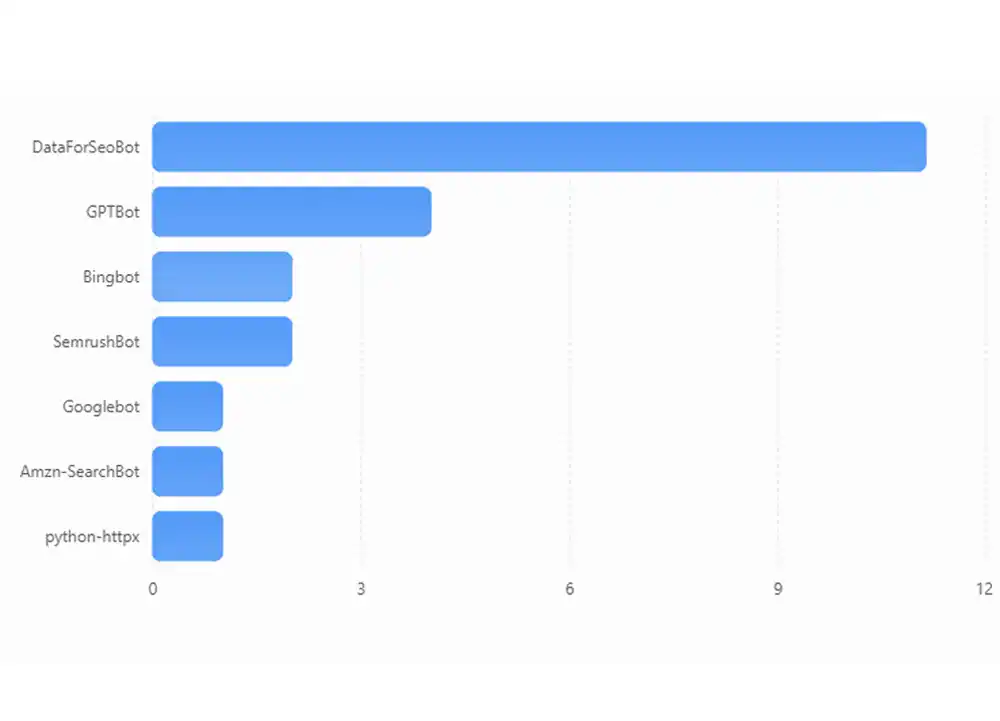
GPTBot, OpenAI's web crawler, appeared in four requests for different articles within approximately two seconds.
The requested articles covered topics including MikroTik, Mailcow and SnappyMail, and my experience troubleshooting Cloudflare.
Meanwhile, DataForSeoBot requested eleven articles within approximately 44 seconds. Its crawling pattern was relatively consistent, with intervals of around four to five seconds between requests.
I began noticing that different crawlers appeared to follow different access patterns. Some requested multiple articles almost simultaneously, while others maintained relatively regular crawling intervals.
However, this small sample wasn't enough to draw general conclusions about how each crawler behaves.
I also needed a reliable way to verify crawler identities instead of relying entirely on User-Agent strings, which can easily be spoofed.
Among the search engine crawlers, one particular request caught my attention.
User-Agent: python-httpx/0.28.1
Request: GET /sse
The interesting part was that blogsite.me didn't have an /sse endpoint.
That path is commonly associated with Server-Sent Events and certain service integrations.
I started investigating the IP address recorded in the database. Based on publicly available network information and reported access patterns, there were indications that the request was associated with internet-wide scanning activity.
However, I didn't immediately classify it as an attack.
It could have originated from a security research system automatically scanning large numbers of publicly accessible domains.
This discovery gradually changed the direction of my experiment.
I no longer wanted to know only how frequently Googlebot visited my articles. I also wanted to understand how automated programs search for specific services, files, and endpoints on publicly accessible websites.
My curiosity eventually led me to Cloudflare Security Events.
There, I discovered several requests that had never appeared in my visitor_logs database.
One originated from a network registered to Google LLC. However, its User-Agent identified itself as a regular Chrome browser rather than Googlebot. Cloudflare blocked the POST request because it matched a security rule designed to detect exploitation attempts targeting a React vulnerability.
I also found another POST request targeting:
/wp-json/batch/v1
Cloudflare identified it through a security rule associated with a WordPress vulnerability.
The interesting part was that blogsite.me didn't use WordPress or React Server Components as its backend. My website was built with CodeIgniter 4.
This suggested that the automated programs sending these requests might have been testing known exploitation patterns without first identifying the technologies used by my website.
I later discovered additional requests targeting /.env, /config.json, and /config that Cloudflare had not mitigated.
After testing those URLs myself, all three returned HTTP 404.
These findings did not establish that any data had been exposed or that the server had been compromised. However, they helped me understand that publicly accessible websites receive all kinds of automated requests, including attempts to access files and endpoints that don't actually exist.
And it turned out that Cloudflare was showing me only part of the activity I wanted to investigate.
While developing my Bot Logger, I discovered another limitation.
The filter I had implemented in CodeIgniter 4 didn't consistently record requests for URLs that had no corresponding route.
I confirmed this by sending test requests using curl.
When the requested URL had no matching route, no record appeared in the database. However, after I explicitly created a route that returned HTTP 404, the request was successfully recorded.
I subsequently implemented set404Override() to capture bot requests targeting unknown URLs.
The next challenge was visibility.
Not every HTTP request reaches CodeIgniter 4. Some are handled directly by Apache, while others may be served from Cloudflare's cache or blocked before reaching the origin server.
I eventually examined my server's access logs using:
sudo tail -n 20 \
  /var/log/apache2/domains/blogsite.me.log
That was when I discovered something considerably more interesting.
On September 25, 2026, I found an IP address that had sent 20 requests within approximately three seconds.
The requests used Go-http-client/1.1, a User-Agent associated with an HTTP client written in Go. At that point, I hadn't included it in my filter's detection keywords.
The requests attempted to locate configuration files, database backups, diagnostic endpoints, and other potentially sensitive resources.
Of those 20 requests, 19 returned HTTP 404. The only HTTP 200 response came from a GET request to the homepage, which was publicly accessible as expected.
The activity suggested an automated scanner working through a predefined list of commonly targeted URLs.
Interestingly, the scanner attempted to access endpoints associated with several different technology stacks.
This reinforced my suspicion that it was using a generic scanning strategy rather than targeting blogsite.me based on knowledge of its actual architecture.
I also observed ordinary browser activity in the Apache logs, including requests for articles, images, and a CSS source map that wasn't available.
This highlighted an important distinction: not every HTTP 404 response indicates malicious activity.
Context matters. Request frequency, User-Agent information, and the sequence of requested URLs are essential when distinguishing normal browsing from automated security scanning.
As more data accumulated, it became clear that I needed a dedicated monitoring system.
My original database captured only basic request information. I gradually extended it to include the HTTP method, status code, response time, Cloudflare Ray ID, and bot verification status.
I also encountered a duplicate logging problem.
A single Amazonbot request appeared once in the Apache access log but twice in my CodeIgniter 4 database.
The investigation pointed me toward a filter configuration that registered the logger globally and also applied it explicitly to article routes.
This was an important lesson for the project: duplicate records could distort crawler statistics and lead to incorrect conclusions about request frequency.
After working through these issues, I decided to develop a separate application.
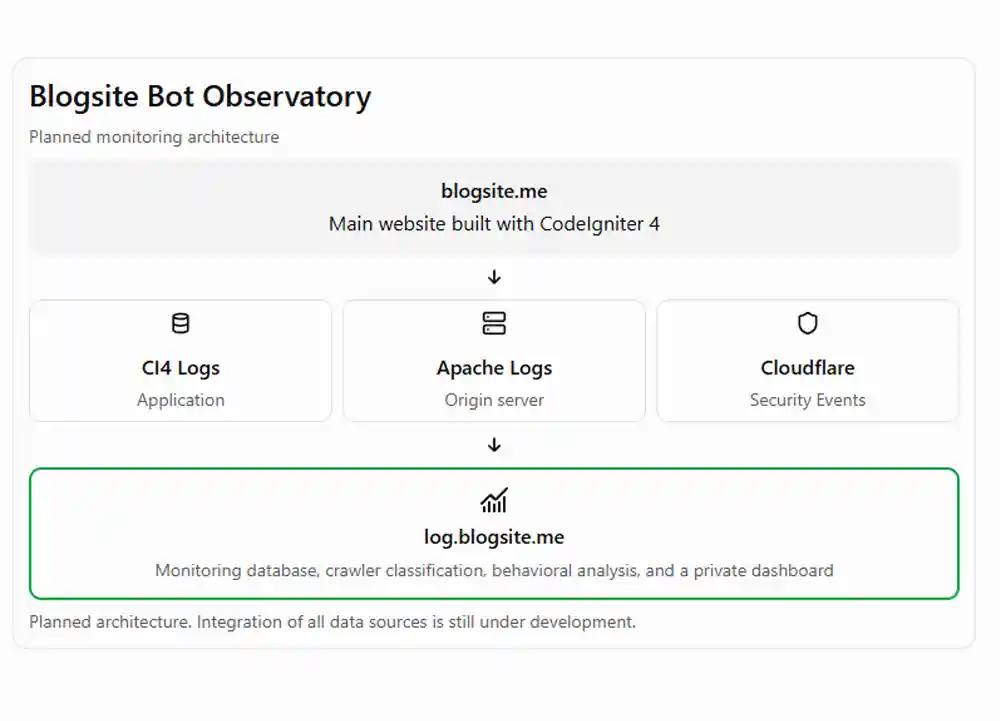
The application, hosted at log.blogsite.me, will serve as a dedicated environment for investigating and analyzing this information.
My goal is to build a dashboard that does more than display request counts.
I want it to reveal crawler access patterns, frequently targeted URLs, HTTP response codes, bot verification status, and detected security activity.
For crawler identification, I plan to combine User-Agent analysis with DNS verification or official IP address lists whenever they are available.
At one point, I considered removing Cloudflare entirely so that I could observe all incoming HTTP traffic directly through my web server.
However, that approach would introduce additional security responsibilities.
Without Cloudflare acting as a reverse proxy, my server would have to handle incoming traffic directly, including automated activity that could potentially overwhelm its resources.
At the same time, Cloudflare's more comprehensive raw HTTP request logging capabilities were beyond the budget of my personal experiment.
I eventually decided to keep Cloudflare Free and combine multiple data sources instead.
Apache access logs will help me understand the requests that reach my origin server. CodeIgniter 4 provides application-level context, while Cloudflare Security Events offers additional visibility into requests handled by its security systems.
This approach still has limitations.
Cloudflare Security Events may use sampling, which means the available data doesn't necessarily include every individual request.
Consequently, I won't treat the dashboard as a perfect record of every automated interaction with blogsite.me.
Instead, I want to build an observability system whose data can be examined, analyzed, and progressively improved while continuing to protect visitor privacy.
It all started with a small file called robots.txt.
I simply wanted to keep my articles discoverable through search engines without necessarily granting unrestricted access to crawlers collecting content for AI model training.
However, the issues I encountered after migrating to Cloudflare raised a completely different set of questions.
I started learning more about how CDNs serve content, how crawlers interact with websites, and how automated scanners search for endpoints I had never even created.
What interests me most isn't simply the number of bots visiting my website.
I want to understand their behavior: why a crawler requests certain articles, how frequently it returns, and how ordinary crawling can be distinguished from automated security scanning.
Those questions eventually inspired the Bot Observatory project.
The project is still in its early stages. CodeIgniter 4 request logging is working, I've located and examined the Apache access logs, and I'm currently developing the monitoring dashboard.
I don't yet know what the data will reveal after several weeks or months of observation. But that's precisely what makes the experiment interesting.
As it turns out, there's much more happening behind a website than the visitor numbers we see in Google Analytics.