STORIES, IDEAS, AND INSPIRATION
From Zimbra to Mailcow: Building a Lighter, Flexible Multi-Domain Mail Server
21 Sep
2026
At some point, I started asking myself a simple question:
Why does running a mail server have to feel this heavy?
I had already worked with Zimbra and had even managed to customize its login page successfully. Zimbra is a mature platform, and I still think it has its place. It gives you a complete mail environment, webmail, user administration, domain management, and plenty of enterprise-oriented features.
But my requirements had started to change.
I was no longer looking for a large all-in-one mail platform just because it could do everything.
I wanted something lighter.
Something easier to manage across multiple domains.
Something that did not require oversized VPS resources just to run comfortably.
And most importantly, I wanted much more freedom over the user-facing webmail experience.
If a customer wanted their own logo, colors, login design, or even a completely different webmail frontend, I did not want the mail server itself to become the obstacle.
That search eventually led me to Mailcow.
I Wasn't Looking for "The Best Mail Server"
I was looking for the mail server that matched the way I wanted to work.
My checklist was fairly straightforward:
Support multiple domains on one server.
Make mailbox and quota management simple.
Integrate SPF, DKIM, DMARC, spam filtering, and antivirus cleanly.
Run comfortably on a VPS without Zimbra-level resource expectations.
Preferably use Docker to simplify service management.
Allow the webmail layer to be customized heavily.
Leave room for white-label implementations.
Avoid making customization feel like I'm fighting the platform.
Mailcow stood out because its architecture felt much closer to that model.
It combines several familiar components:
Postfix
Dovecot
Rspamd
SOGo
ClamAV
Redis
MariaDB
Nginx
ACME
and runs them through Docker Compose.
That matters because the actual mail infrastructure and the webmail experience do not have to be treated as one inseparable product.
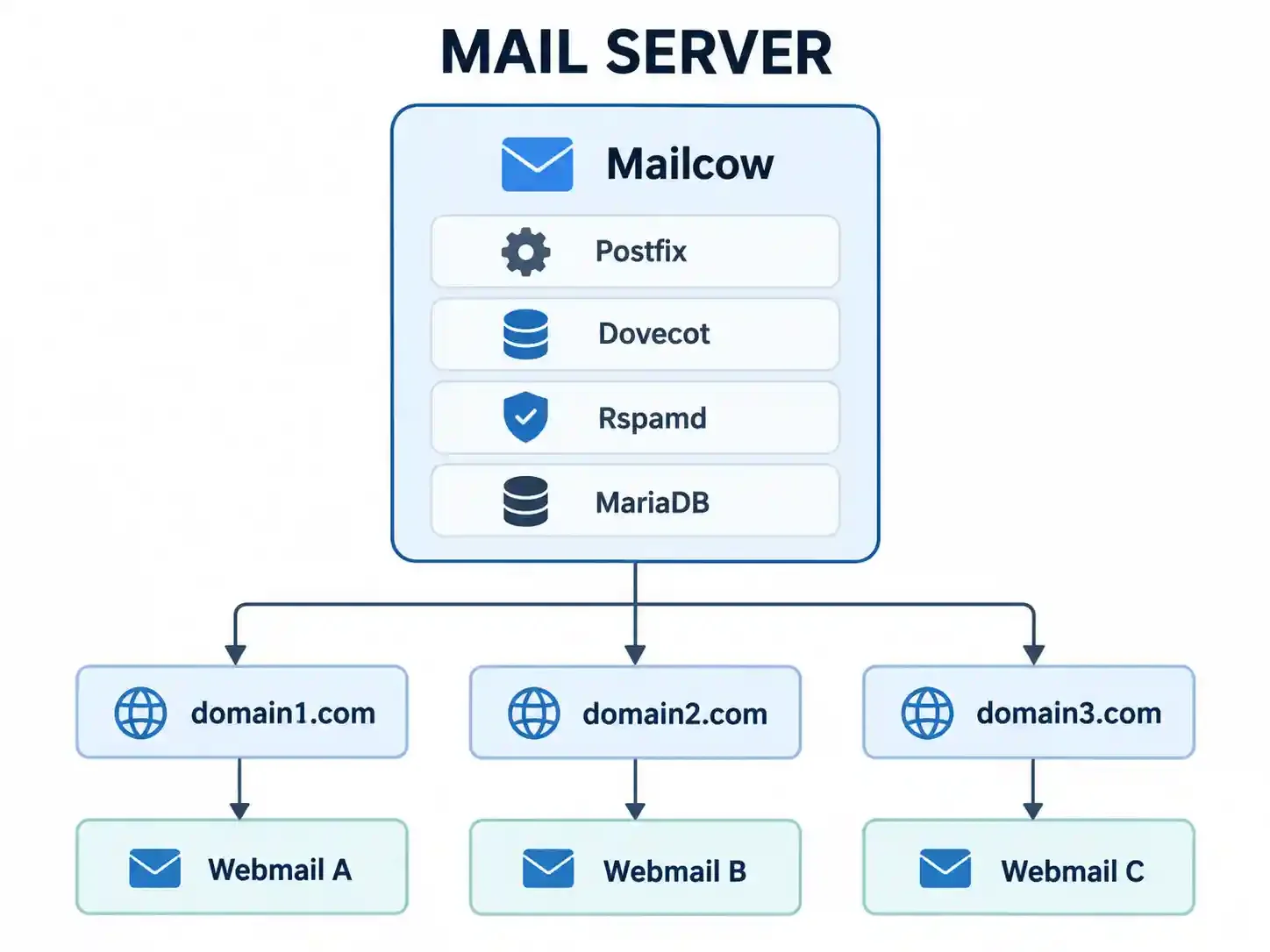
Conceptually, I could build something like this:
That was already much closer to what I had in mind.
Starting With a Reasonable VPS, Not a Monster
For this deployment, I used a VPS with:
Ubuntu 24.04 LTS
6 vCPU
11 GB RAM
193 GB Storage
KVM
Public IPv4
Public IPv6
Compared with some heavier mail platforms I had managed before, this felt like a much more reasonable starting point.
Before installing anything, I checked the basics:
RAM
disk space
virtualization
port usage
outbound SMTP connectivity
The first issue appeared almost immediately.
Ports 80 and 443 were still being used by Apache from an older temporary application.
That application was no longer needed, so Apache was stopped and disabled.
Mailcow could then take over HTTP and HTTPS directly.
The server also had no swap, so I added 2 GB.
These are small details, but mail server deployment has taught me that the small details are often the ones that turn into strange troubleshooting sessions later.
Giving the Mail Server a Proper Identity
I chose:
mail.getcv.id
as the primary Mailcow hostname.
The server's IPv4 address was:
For privacy, I replaced the real server IPs in this article with documentation addresses such as 203.0.113.10.
The DNS record:
mail.getcv.id A 203.0.113.10
IPv6 was configured as well:
mail.getcv.id AAAA IPv6-server
I also configured PTR / reverse DNS back to:
mail.getcv.id
So the forward and reverse DNS matched:
203.0.113.10
↓ PTR
mail.getcv.id
mail.getcv.id
↓ A
203.0.113.10
For a mail server, this is not cosmetic configuration.
A server can technically send mail without a clean mail identity, but that does not mean Gmail, Outlook, or other providers will trust it.
Installing Mailcow Was Surprisingly Straightforward
Once Docker was ready, Mailcow itself was relatively painless to deploy.
The repository was cloned into:
/opt/mailcow-dockerized
Then I ran:
./generate_config.sh
The hostname:
mail.getcv.id
The timezone:
Asia/Jakarta
Because the VPS had working IPv6 and I had already configured an IPv6 PTR record, I left IPv6 support enabled.
Then came the image pull:
docker compose pull
and finally:
docker compose up -d
A few minutes later, the stack was running.
ACME detected both the A and AAAA records and automatically requested a Let's Encrypt certificate.
The log eventually showed:
mail.getcv.id verified!
Certificate signed!
Certificate successfully obtained
At that point:
Postfix running
Dovecot running
Rspamd running
SOGo running
Nginx running
HTTPS valid
This was the point where everything looked almost too smooth.
Of course, that did not last.
The First Real Problem: SOGo Said "Unauthorized"
I added the first domain:
getcv.id
Then I created a mailbox.
Login through:
https://mail.getcv.id
worked.
Mailcow redirected the session to:
/SOGo/so/
And then:
Unauthorized
This is where the deployment turned into a real work story.
I started checking everything.
The mailbox was active.
SOGo access was enabled.
The domain was active.
The alias existed.
Mailcow recorded the SSO login.
The SOGo container IP was correct.
The internal SSO password used by PHP and Dovecot matched.
The _sogo_static_view database table also contained the mailbox.
Everything seemed to say:
This user should be allowed in.
But SOGo kept returning:
403 Forbidden
Unauthorized
I went through Nginx auth requests, PHP sessions, Dovecot SSO, database records, and SOGo configuration.
Then the actual fix turned out to be much simpler.
In the Mailcow admin interface, there is a Validate GUID action.
I clicked it.
Logged in again.
And SOGo opened normally.
That was it.
A long troubleshooting session ended with one button.
This is exactly why I like writing down real deployment stories instead of only writing perfect tutorials. Real infrastructure work is rarely linear.
One day, someone else may hit:
Mailcow login successful
↓
Redirect to /SOGo/so/
↓
Unauthorized
and the first thing worth checking may simply be:
Validate GUID.
Setting Up SPF, DKIM, and DMARC
Once mailbox access was working, I moved on to domain authentication.
MX:
getcv.id MX 10 mail.getcv.id
Initial SPF:
v=spf1 mx a -all
DKIM was generated by Mailcow.
Initial DMARC:
v=DMARC1; p=none; rua=mailto:dmarc@getcv.id
After DNS propagation, I sent a test email from:
admin@getcv.id
to Gmail.
The authentication results were exactly what I wanted:
SPF PASS
DKIM PASS
DMARC PASS
So technically, the sender authentication was correct.
But Gmail still put the message into Spam.
"But It Never Went to Spam When I Used Zoho"
This was probably the most interesting part of the migration.
Before Mailcow, getcv.id had been using Zoho Mail.
Emails sent through Zoho normally reached the Gmail inbox.
After switching to the self-hosted Mailcow server, the first messages started landing in Spam.
Even though:
SPF PASS
DKIM PASS
DMARC PASS
PTR valid
EHLO valid
TLS active
The obvious difference was not the domain.
It was the sending infrastructure.
With Zoho:
admin@getcv.id
↓
Zoho Mail
↓
Established Zoho sending infrastructure
↓
Gmail
With Mailcow:
admin@getcv.id
↓
Mailcow
↓
203.0.113.10
↓
Gmail
The domain stayed the same.
The sending IP did not.
And sender reputation matters.
I checked major RBL sources such as Spamhaus and SpamCop.
The IP was not listed.
That pointed more toward a new or still-unknown sender reputation rather than an active blacklist problem.
I then added getcv.id to Google Postmaster Tools and verified the domain.
At this stage, the plan is not to artificially "warm up" the server by blasting test messages.
The better approach is normal traffic.
Low volume.
Consistent sending.
Real recipients.
Real conversations.
No sudden spikes.
Why Mailcow Feels Better for Multi-Domain Hosting
This is one of the biggest reasons I like the platform so far.
One Mailcow installation can handle several domains:
getcv.id
domain-client-a.com
domain-client-b.id
company-c.co.id
They do not require separate mail servers.
The architecture can stay centralized:

Each domain can have its own:
mailbox limits
quotas
aliases
DKIM
SPF
DMARC
Administration stays centralized without making every customer feel like they are sharing the exact same experience.
That matters a lot if the goal is to host email for several businesses or brands.
The Part I Care About Most: Webmail Does Not Have to Look the Same for Everyone
This was one of my original frustrations with Zimbra.
Changing a logo is easy.
I wanted more than that.
Imagine customer A using:
mail.company-a.com
with their own logo, colors, background, and login layout.
Then customer B using:
mail.company-b.com
with a completely different visual identity.
Mailcow's architecture makes this much more realistic.
SOGo itself can be customized.
Its frontend assets, themes, logos, and resources can be changed.
But more importantly, Mailcow does not force the mail backend to depend entirely on SOGo.
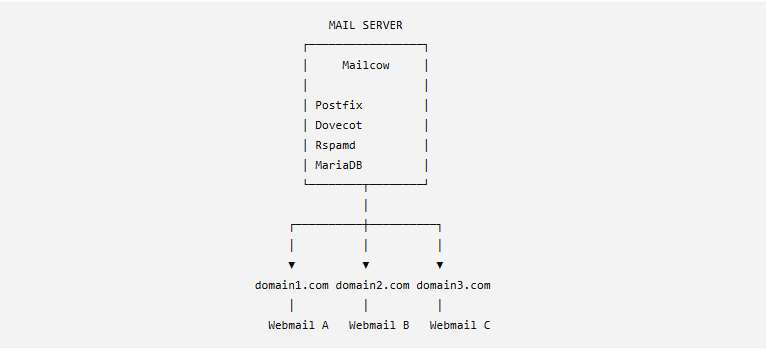
A different webmail client such as SnappyMail can be added in front of the same mail backend.
That creates an architecture like this:
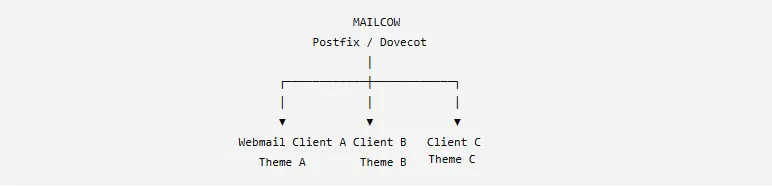
This is the kind of flexibility I was looking for.
Mailcow does not magically provide "white-label per domain" through one checkbox.
That is not what I mean.
What I mean is that the architecture gives me enough freedom to build that experience without replacing the actual mail engine behind it.
That is a huge difference.
Running a Mail Server Is Not the Same as Being Trusted as a Mail Sender
One lesson from this project became very clear:
Installing a mail server is relatively easy.
Getting other mail providers to trust it is the hard part.
Postfix can be installed quickly.
Mailboxes can be created.
Messages can be sent.
But consistent inbox placement depends on much more:
PTR / Reverse DNS
Forward DNS
EHLO
SPF
DKIM
DMARC
TLS
IP Reputation
Domain Reputation
Sending Pattern
Spam Complaints
A response like:
250 OK
does not mean the job is finished.
Even "delivered to Gmail" does not mean the job is finished.
The real goal is closer to this:
Delivered
Authenticated
Trusted
Inbox
Those are four different stages.
What I Learned
This project gave me several useful reminders.
A technically valid email is not automatically a trusted email.
SPF, DKIM, and DMARC can all pass while the message still lands in Spam. Authentication proves identity. Reputation influences trust.
PTR and hostname consistency matter.
A mail server should not look anonymous or inconsistent. mail.getcv.id, its A record, PTR, and SMTP HELO should tell the same story.
Do not move every domain at once.
Using one domain as a pilot gives you room to detect problems before customers are involved.
A simple UI action can solve a deep-looking problem.
The SOGo Unauthorized issue looked like an Nginx, Dovecot, or SSO failure. The fix was Validate GUID.
Multi-domain architecture is easier when the mail backend and frontend are not treated as the same thing.
Mailcow gives me a solid mail backend while still leaving room to experiment with SOGo, SnappyMail, or custom webmail experiences.
Customization matters more when email becomes a service rather than just internal infrastructure.
If customers are going to use the platform, branding, login experience, and domain-specific presentation become part of the product.
Am I Leaving Zimbra Completely?
I do not see it that way.
Zimbra still has a place.
For deployments that genuinely need the Zimbra ecosystem and where server resources are not a concern, it remains a valid platform.
But for what I am building now—
multi-domain mail hosting, lower resource expectations, Docker-based management, and far more freedom over the webmail experience—
Mailcow feels much closer to what I need.
More importantly, I feel like I have more control.
Not only over mailboxes.
But over how the email service itself can eventually be presented to customers.
Current Project Status
At the time of writing:
Mailcow Running
IPv4 Active
IPv6 Active
SSL Let's Encrypt Active
SPF PASS
DKIM PASS
DMARC PASS
PTR Valid
Gmail delivery Success
Google Postmaster Verified
Multi-domain Ready
The one thing I am still watching closely is Gmail sender reputation, because this IP has only recently started sending mail for the domain.
I am intentionally not moving every customer domain yet.
getcv.id is my pilot domain.
If delivery remains stable, mail stops landing in Spam, the queue stays clean, and reputation starts forming normally, I will begin adding the next domains.
That feels much safer than migrating everything at once and troubleshooting under pressure after multiple users are already depending on the system.
Final Thoughts
This project started with a simple question:
Is there a mail server that feels lighter than my Zimbra setup, handles multiple domains cleanly, and gives me enough freedom to customize the webmail experience for different customers?
So far, Mailcow is very close to the answer I was looking for.
It was not completely plug-and-play.
I still ran into port conflicts, Docker IPv6 configuration, DNS, PTR, SSL, SOGo Unauthorized, GUID validation, and Gmail reputation issues.
But that is exactly what made the project useful.
Once I started understanding how the pieces fit together, Mailcow stopped feeling like a closed email application.
It started feeling more like a mail platform I can use as the foundation for building my own email service.
And for the kind of system I want to build, that difference matters.